Public Wi-Fi Spoofing: The "Evil Twin" Attack That Targets Tourists
Imagine this: You've just arrived at a bustling international airport after a grueling 12-hour flight. Your first instinct is to connect to the int...
Public Wi-Fi Spoofing: The "Evil Twin" Attack That Targets Tourists
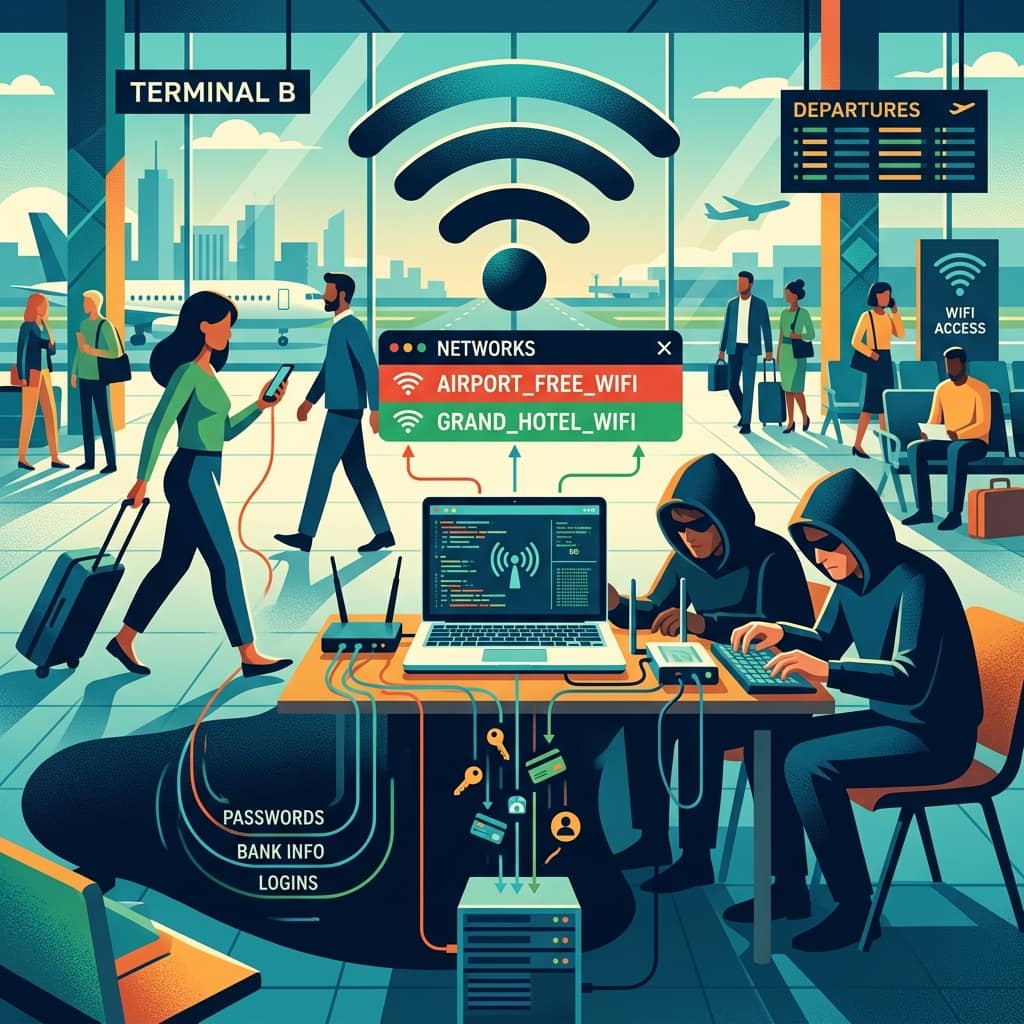
Imagine this: You've just arrived at a bustling international airport after a grueling 12-hour flight. Your first instinct is to connect to the internet to let your family know you landed safely, check your hotel reservation, and maybe hail a ride. You open your phone's Wi-Fi settings and see an open network named "Free_Airport_WiFi." Without a second thought, you connect. What you don't realize is that you haven't connected to the airport's official network at all. Instead, you've fallen into the trap of an "Evil Twin"—a fake public Wi-Fi hotspot set up by scammers to steal your personal and financial information.
Public Wi-Fi spoofing, commonly known as the Evil Twin attack, is one of the most insidious cyber scams targeting travelers today. Because tourists rely heavily on free internet connections at cafes, airports, and hotels, they are prime targets for opportunistic cybercriminals. Let's delve deeply into how this scam works, the massive risks involved, and exactly how you can protect your digital life while traversing the globe.
What is Public Wi-Fi Spoofing (The "Evil Twin" Attack)?
An Evil Twin attack involves a cybercriminal setting up a fraudulent Wi-Fi access point that perfectly mimics a legitimate network. By broadcasting a network name (SSID) that looks completely trustworthy, the scammer tricks nearby users into connecting to their rogue hotspot instead of the real one.
Once your device connects to the Evil Twin, the scammer essentially becomes a "man in the middle." They can monitor all the unencrypted data traveling between your device and the internet. This means every website you visit, every password you type, and every credit card number you enter can be intercepted in real time.
Pro Tip: Always verify the exact name of the official Wi-Fi network with hotel staff or airport information desks. Cybercriminals often use names that are just one character off from the legitimate network, such as "Hilton_Guest_Wifi" instead of "Hilton_Guest_WiFi".
How the Scam Unfolds Step by Step
Understanding the methodology behind the Evil Twin scam can help you spot it before it's too late. Here is how the trap is typically set and sprung:
1. Scouting the Location
Scammers look for areas densely populated with tourists who are likely to need internet access. Airports, train stations, popular coffee shops, and hotel lobbies are their favorite hunting grounds.
2. Creating the Rogue Network
Using relatively inexpensive and readily available hardware, the scammer sets up a portable router. They configure this router to broadcast an SSID that mimics the location they are targeting. For example, if they are sitting in a Starbucks, they might name their network "Starbucks_Free_WiFi".
3. Boosting the Signal
To ensure you connect to their fake network instead of the real one, the scammer will often boost their router's signal strength. Devices are programmed to automatically connect to the strongest known signal, making the Evil Twin incredibly effective.
4. Harvesting the Data
Once you connect, you might see a fake captive portal—a login page that looks identical to a hotel or cafe's standard Wi-Fi agreement page. When you enter your email or social media login to gain access, the scammer captures those credentials immediately. Worse, as you browse the web, they passively record your online banking logins, credit card numbers, and private messages.
Important: Never perform sensitive transactions, such as online banking or online shopping, while connected to public Wi-Fi—even if you believe it is the legitimate network. Wait until you have a secure, private connection.
The Massive Risks of Falling Victim
The consequences of connecting to an Evil Twin network can be devastating, especially when you are thousands of miles away from home.
Identity Theft
If a scammer intercepts your login credentials for your email or social media accounts, they can quickly steal your identity, locking you out of your own life and potentially using your accounts to scam your friends and family.
Financial Ruin
By capturing your banking passwords or credit card information, cybercriminals can drain your bank accounts, max out your credit cards, and leave you stranded in a foreign country without access to funds.
Malware Installation
Some sophisticated Evil Twin attacks go beyond passive snooping. They can actively inject malware, ransomware, or spyware onto your smartphone or laptop, compromising your device long after you've disconnected from the fake network.
Red Flags to Watch Out For
While Evil Twin networks are designed to look identical to legitimate ones, there are often subtle clues that can give them away:
- Multiple Networks with the Same Name: If you see two networks with identical or strikingly similar names (e.g., "Airport_Free" and "Airport_Free_2.4G"), proceed with extreme caution.
- Unusual Login Pages: If the captive portal asks for excessive personal information, such as your credit card number for "identity verification," it's likely a scam.
- Slow Connection Speeds: Because the scammer's router is acting as a middleman and routing traffic through a potentially slower cellular connection, the internet speed might be noticeably sluggish.
- Browser Security Warnings: If your web browser warns you that a website's security certificate is invalid or that the connection is not private, disconnect immediately.
Fascinating Fact: According to recent cybersecurity reports, nearly 25% of travelers have had their personal information compromised while using public Wi-Fi abroad, often without realizing it until they return home.
How to Protect Yourself and Stay Secure
You don't have to swear off public Wi-Fi entirely to stay safe. By implementing a few robust cybersecurity habits, you can protect yourself from Evil Twin attacks.
Use a Virtual Private Network (VPN)
A VPN is your absolute best defense against public Wi-Fi spoofing. When you use a VPN, all of your internet traffic is encrypted and routed through a secure server. Even if you accidentally connect to an Evil Twin, the scammer will only see scrambled, unreadable data. Make it a habit to turn on your VPN before connecting to any public network.
Stick to Cellular Data
Whenever possible, use your cellular data instead of public Wi-Fi. If you are traveling internationally, consider purchasing a local SIM card or setting up an eSIM before you arrive. Not only is cellular data significantly more secure, but it also frees you from having to hunt for Wi-Fi hotspots.
Turn Off Auto-Connect
Most smartphones and laptops have a feature that automatically connects to known or open Wi-Fi networks. Turn this feature off in your device settings. You should always manually choose which networks to join so you aren't silently connected to a rogue hotspot while your phone is in your pocket.
Enable Two-Factor Authentication (2FA)
Make sure that 2FA is enabled on all of your crucial accounts (email, banking, social media). Even if a scammer manages to steal your password via an Evil Twin, they will not be able to access your account without the secondary code sent to your phone or authenticator app.
What to Do If You Suspect You've Been Compromised
If you realize you've connected to a suspicious network and potentially exposed your data, act quickly:
- Disconnect Immediately: Turn off your Wi-Fi or "forget" the network in your settings.
- Change Your Passwords: Using a secure cellular connection, change the passwords for any accounts you logged into while on the fake network.
- Monitor Your Accounts: Keep a close eye on your bank and credit card statements for any unauthorized transactions.
- Run an Antivirus Scan: If you were using a laptop, run a comprehensive malware scan to ensure nothing malicious was downloaded.
Conclusion
The convenience of public Wi-Fi is undeniable, especially when traveling. However, the rise of Evil Twin attacks means that you can no longer blindly trust open networks. By staying vigilant, verifying network names, and utilizing essential security tools like a VPN, you can enjoy the benefits of staying connected without falling prey to digital pickpockets. Don't let a momentary lapse in digital hygiene ruin your well-deserved vacation.
Frequently Asked Questions (FAQs)
Q: Can a VPN really protect me from an Evil Twin attack? A: Yes. A reputable VPN encrypts your data before it leaves your device. Even if a scammer intercepts the data via an Evil Twin, they won't be able to decrypt or read it.
Q: Is it safe to use hotel Wi-Fi if it requires a password? A: It is safer than an open network, but not foolproof. Scammers can still set up an Evil Twin network that requires the exact same password provided by the hotel reception. Always use a VPN, even on password-protected public networks.
Q: How do scammers make money from stealing my Wi-Fi data? A: They can directly drain your bank accounts if they capture those logins, or they can sell your personal information (like email addresses, passwords, and credit card numbers) on the dark web to other cybercriminals.
Q: Can I get hacked just by connecting to the network, even if I don't type anything? A: Yes, it is possible. Sophisticated attackers can exploit vulnerabilities in your device's operating system to install malware silently the moment you connect to their rogue network, which is why turning off auto-connect is crucial.
Get more practical guides like this
Follow the RSS feed or send Sahi.info to your WhatsApp circle so the practical guides keep moving.